

How do Dynamic Search Ads work?
Ads without keyword selection
No more need to manually select keywords for your ads:
Google will do the work for you by scanning the pages of your site. The most relevant keywords corresponding to the searches of internet users are selected. Your work will consist of filling in the description lines of your ad. The title and redirects will be dynamically generated by Google. That means the advertisement displayed on the search engine will present a title generally inspired by the Title, the H1/ H2 of the page in question and the link will redirect to it.
Manage the targeting of your ads
You decide which pages will be considered for DSA: you can exclude pages, use your entire site or only certain URLs, depending on your objectives.
Example: A merchant in the fashion industry will be able to use DSA for its "Women's Fashion > Spring Summer Season" pages (and exclude all others) to focus on the products with the best conversion rate for its site.
Pros and cons
First of all, DSA campaigns represent a considerable time saving, especially for those who manage your Google Ads campaigns themselves, without the help of an agency.
They are particularly suitable for e-merchants with a well-structured site and a complete inventory, whose products and/or services are regularly updated, as the workload updating these types of ads manually would be significant.
Example: A tour operator whose price offers and availability information change on a regular basis, or an e-merchant in the cultural products sector who manages a large volume of references.
Dynamic search network ads can also be a solution to cover your "long tail" potential. They often serve as a test to analyse and highlight successful keywords to be used in other, more personalised campaigns. This dynamic ad format helps to fill in the gaps in the usual Search campaigns.
Note: segmentation work is still necessary for DSA campaigns. Good targeting will always be the key to the success of your campaigns. Ensure the content and natural referencing of your site is optimised before using it as a basis for your campaigns.
We advise not betting everything on these campaigns, and to additionally create "classic" campaigns for all the strategic keywords related to your business. Keep in mind that your Search campaigns will always have priority.
How to integrate Dynamic Search Ads with Lengow
Targeting based on data feed
There are
different types of targeting
: by category, by URL, by pages containing certain keywords or by feed. If your online store changes frequently, Google strongly recommends that e-merchants use page feed targeting for better control of their ads. By providing a catalogue containing your landing pages, you help Google Ads determine when to serve your ads and where to redirect users to your website.
You can precisely target the pages to be used for your DSA campaigns thanks to a list of URLs in Google's "page feed".
This feed should contain at least:
- the URL of the page you want to target,
- one or more custom fields to be used as a basis for targeting ads.
- Example: You make a 30% promotion on specific products. You will then create a personalised label "30% discount" that groups together the URLs of the products concerned, so that you can then create specific ads.
Example of usage in Lengow
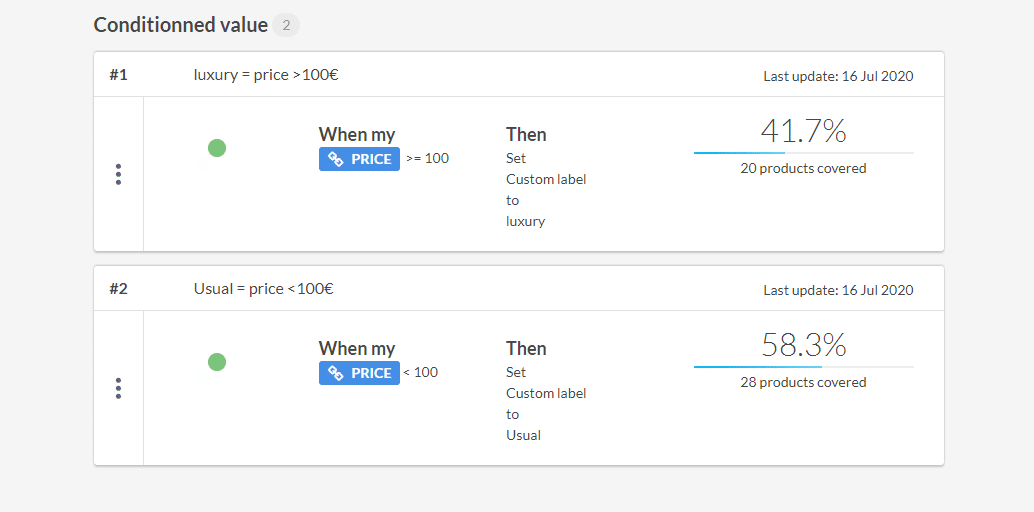
You want to differentiate your "Luxury" products from the rest of your catalogue in order to have two different Dynamic Search Ads campaigns. The first one will gather products with a price higher than £100 and the second one will gather products worth less than £100.
By setting up the first custom label, "luxury", you can make it a condition to only take into account products with a price is equal or superior to £100. In our example this represents 41.7% of the product catalogue.
By defining the second custom label, "Usual" you make a condition to only take into account products at a price less than £100. This represents 58.3% of the products in the catalogue.
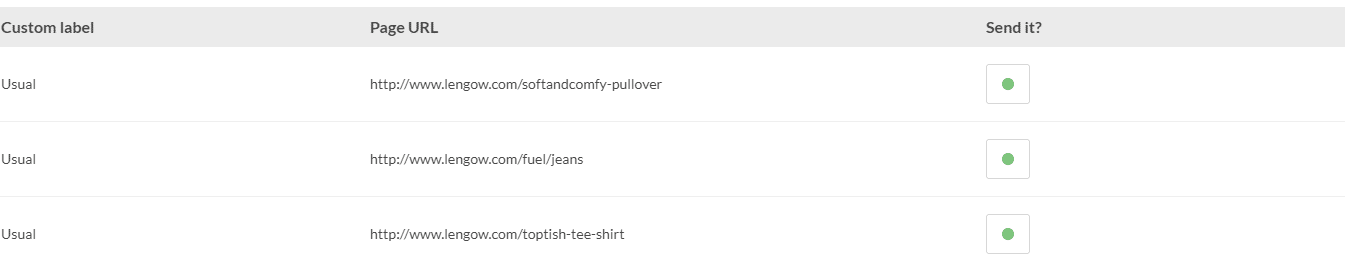
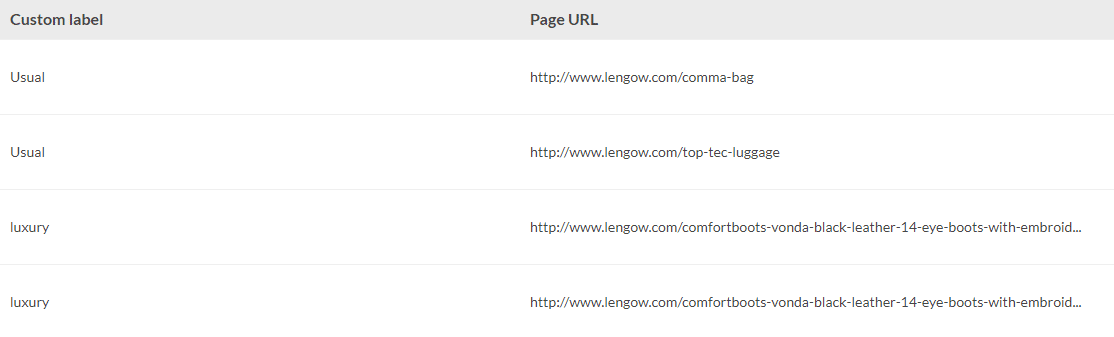
Your personalised Google feed is then generated with the two required fields: URL + Custom Label:
Once the feed is sent to Google, all the management is then done in the Google interface to create your two DSA campaigns according to the price of your products.
For more details, find the detailed steps in our
Help Center
.
.png)